

I’ve had 5 Claude Code Opus agents running as my personal Chief-of-staff team for the last 3 months.
They handle everything from filling out forms, to grinding spreadsheets, to producing marketing videos, so I can focus on the uniquely human parts of being a CEO.
I’d say I’m somewhere between 1.5x and 2x my pre-AI self now.
It’s not off-the-shelf. But it’s not hard to set up. It took me an afternoon. And most of the setup is asking the agents to configure themselves. The only real prerequisites are a claude sub, and basic comfort with the terminal.
What Can They Actually Do?
The decoy use case I see often is getting a ‘morning briefing.’ My Chiefs do that, but it really undersells the potential here. They can do so much more.
My Chiefs are experts in the Zenlytic books and investor reporting. They’ve made several promotional videos for us (more on that in a minute). They manage a bunch of our CRM. Of course, they helped me write this post.
The secret is the environment. If they have the right tools, agents are now capable of end-to-end work. I can tell an agent:
“Hey, our accountant just sent the November books - look for any inconsistencies with our rev rec or other general errors, draft me a reply, and add the numbers to the investor update we’ve been working on.”
It pulls spreadsheets from Drive, cross-references against my notes, and just does everything. That used to be a half-day project. Now it takes about 20 minutes, and most of that is me reviewing the output.
It’s weird to ask “How can my agents help here?” for anything that you work on. But they’ll often surprise you with their capabilities.
For example: I needed to make a promotional video for Zenlytic. I asked my agents to brainstorm concepts in a Model Council (a deep-thought skill that uses the OpenAI, Gemini, and Claude APIs to critique each other’s answers). I chose the winning concept, an agent drafted the script, generated keyframe images with Gemini, drew the animations using Kling, and stitched everything together with Remotion.
I reviewed and adjusted at each step. The whole thing took half an hour. Here’s the result.
The Architecture
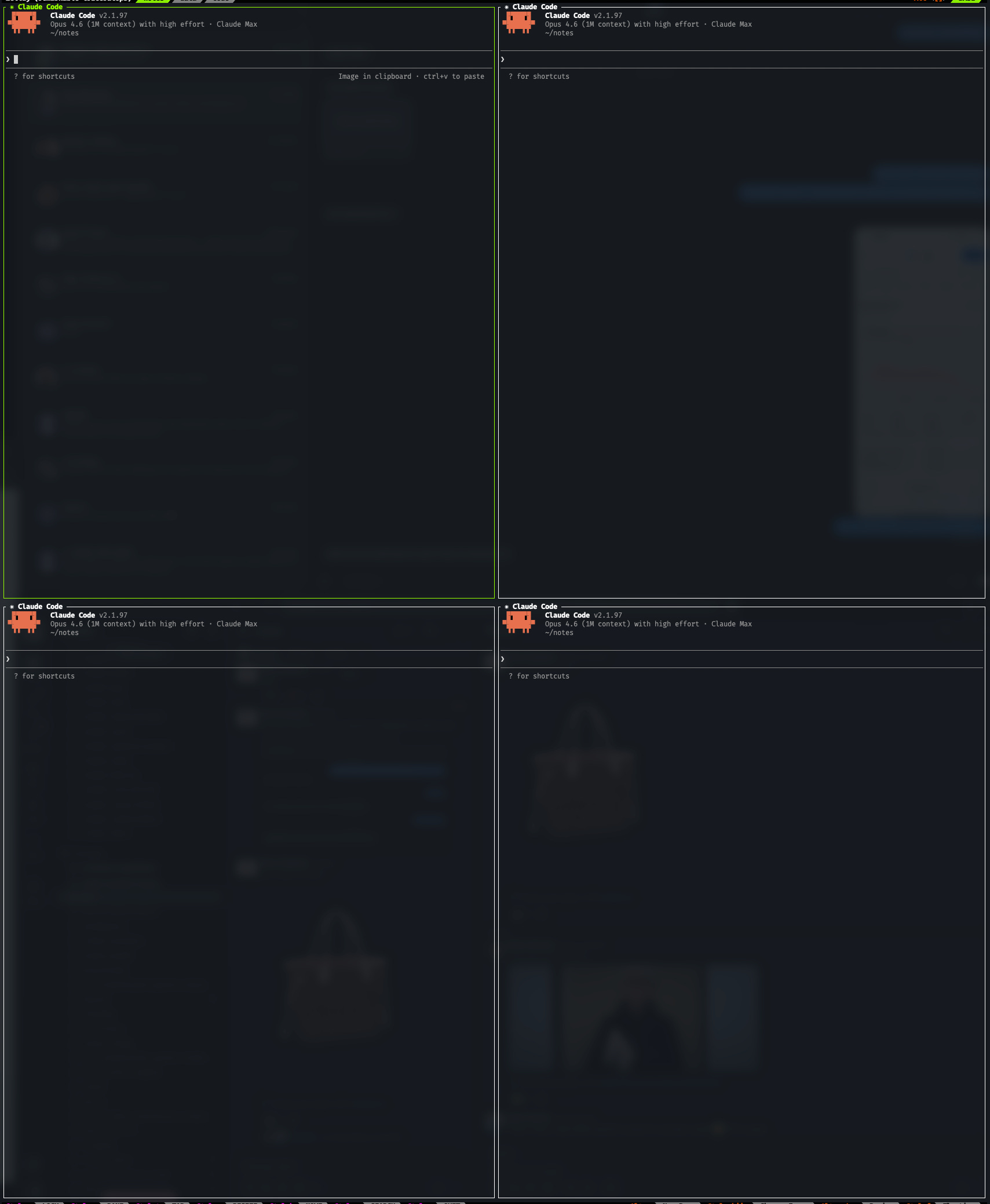
Each agent is just a Claude Code instance in the terminal. That’s it.
I run several in Zellij panes so I can tee up multiple tasks at once (typically 1 or 2 are working on something; 5 is the peak I can sustain). But this part is optional.
There are other harnesses: Codex, Claude Cowork, OpenClaw, Hermes. I’d recommend Claude Code for now, but this is changing quickly. Cowork will get there (Anthropic built it for exactly this use case). But I’m using Claude Code because I have complete control/breadth over the environment.
The Environment IS the Product
Here’s the thing that people don’t seem to believe yet: the model and the harness matter way less than what you plug into them.
Agents become exponentially more useful with each tool you connect. Each tool is a combination of skills (markdown instruction files), MCP servers, and CLI wrappers.
Every single one of my skills was built by Claude at my request. For two reasons: I don’t need to trust random GitHub packages, and the skill ends up personalized for exactly my workflow.
Making new skills is dead simple. You just finish a project and say “save what you just did as a skill.”
My “I know kung fu“ moment was when I told Claude “I need you to be able to update our HubSpot.” It wrote a script, tested it, saved it as a skill, and gave me directions on where to get an API key.
I now have 32 custom skills across all agents: email review, spam clearing, team follow-ups, social engagement tracking, meeting todo extraction, data model editing, product changelog creation, Excel and PowerPoint, and more.
Here’s what’s wired up right now:
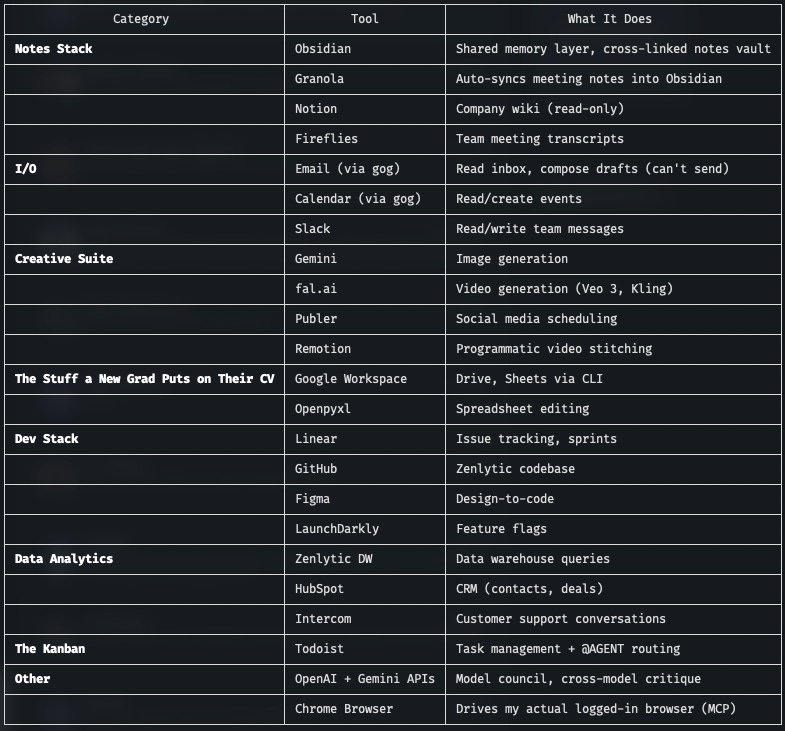
Calling out some of the foundational tools:
Obsidian is the rock the whole thing is built on. It’s a cross-linked notes vault where writing, projects, and meeting notes all live. The agents read and write to it directly. This is what breaks them out of the context window: a collective living memory of everything they’ve been working on. It enables compounding knowledge and easy hand-offs between agents (and with me).
Granola captures and indexes my meetings into Obsidian automatically. This, plus mail inbox, plus downloads folder are what make the agents feel like they know everything I’ve been doing. Context is the real product here.
Todoist is my actual todo list. But extended into an ad hoc kanban board. Every task I think an agent can help with, I (or another agent) tag with @AGENT. My agents check on a cron job a few times a day and pick up whatever they should be working on.
Email and Slack are the connective tissue. Yes, they’re essential for tying into real workflows. But the bigger surprise: your email and Slack history are the most comprehensive database of your life. Also: Claude is far better at finding old emails than any search I’ve ever used. It found me the name of a realtor who emailed me once over 5 years ago in seconds.
Everything is designed so I share space with the agents, using the tools I’ve always used. My Todoist tracks my tasks alongside the @AGENT tasks. We’re both adding and updating stuff as we pass projects back and forth. We’re co-writing an Obsidian vault, and it’s in the best shape it’s ever been (because the agent organizes it for me).
Self-Improvement
Research is advancing rapidly on recursive self-improvement, and I think it’s going to be the next important pattern in AI.
But A homebrew version of it exists today.

I’ll do a deep dive on this in a dedicated post, but here’s the single fastest way to achieve self-learning. Every skill file gets a self-improvement section at the bottom:
## Self-Improvement

After each use of this skill, update it:
- If a command fails or needs a workaround, document the fix.
- If you discover a better approach or pattern, add it.
- If the user corrects you, incorporate the correction.
- Don't add one-off actions. Only log patterns that will repeat.

The goal: this skill should get smarter every time it runs.
The agent reads these instructions, and after every run it edits its own skill file with what it learned. My CFO skill for analyzing monthly financials has been rewritten by the agent itself 6 times. Each version catches more edge cases, handles more date formats, and formats the output closer to what I actually want in the investor update.
I didn’t write any of those improvements.
Keeping It Safe
If running AI agents with access to your email, calendar, and financial data sounds scary to you: good. It should.
A few principles I follow:
Don’t skip the permissions. I review all actions by hand even though it’s slower. I haven’t seen anything truly scary yet, but I occasionally catch an agent doing something dumb (once it tried to reply-all to an investor thread with a half-finished draft; the drafts-only gate caught it).
Watch them. This is one of the big reasons to use Claude Code or Codex right now vs. OpenClaw or Hermes. You can literally see every action in the terminal as it happens.
Agents propose, humans commit. My agents write email drafts, but can’t send. The config blocks sending at the OS level.
Principle of least access. A lot of my tools are read-only by design. Sandboxes everywhere. Sudo-gated secrets. If the agent doesn’t need write access, it doesn’t get it.
How to Get Started
Get a Claude subscription (start with normal and move to max if you need to) and install Claude Code.
Pick one folder. Install an Obsidian vault there if you don’t have one already. Then, load up Claude Code. Tell it who it is, what it can access, how it should behave. Think job description, not prompt.
Connect it to something real. Your notes folder, your calendar, your email (read-only at first). One connection is enough to feel the difference.
Use it for a week. Then ask it: “What did you learn? Write it down.” Save that as a skill. Ask it what else it can help you with.
Keep adding skills every time it gets stuck on the workflow. Can’t save as a word doc? Ask it how to make a skill. And so on.
Once the environment is complete, the hardest part is having the creativity to discover new use cases. But their capabilities will surprise you.
Find your superpowers
Models change. Environments compound.
Right now, it’s a little messy to set up. You’re gonna spend some time squinting at IBM Mono in a pretty nerdy terminal.
But that’s the opportunity. If you wire up your own system, you get there before everyone else.